 RTOGuard
See the ROAS you really keep, per campaign, ad set and ad.
Ads Manager counts a COD order as a sale when it is booked. RTOGuard follows it until the money is kept or lost, and shows real ROAS next to the number you are used to.
The money view
Every order moves through four stages:
- Booked: all orders placed.
- Cancelled: stopped before shipping.
- Returned (RTO): shipped and sent back. Returns and exchanges from Shopify count too.
- Kept: the revenue that actually reached you.
Blended ROAS vs real ROAS
Blended ROAS divides all booked revenue by ad spend. Real ROAS divides kept revenue from ad orders, after RTO, returns and exchanges, by the same spend. The gap between them is what RTO is costing your ads. How to calculate it.
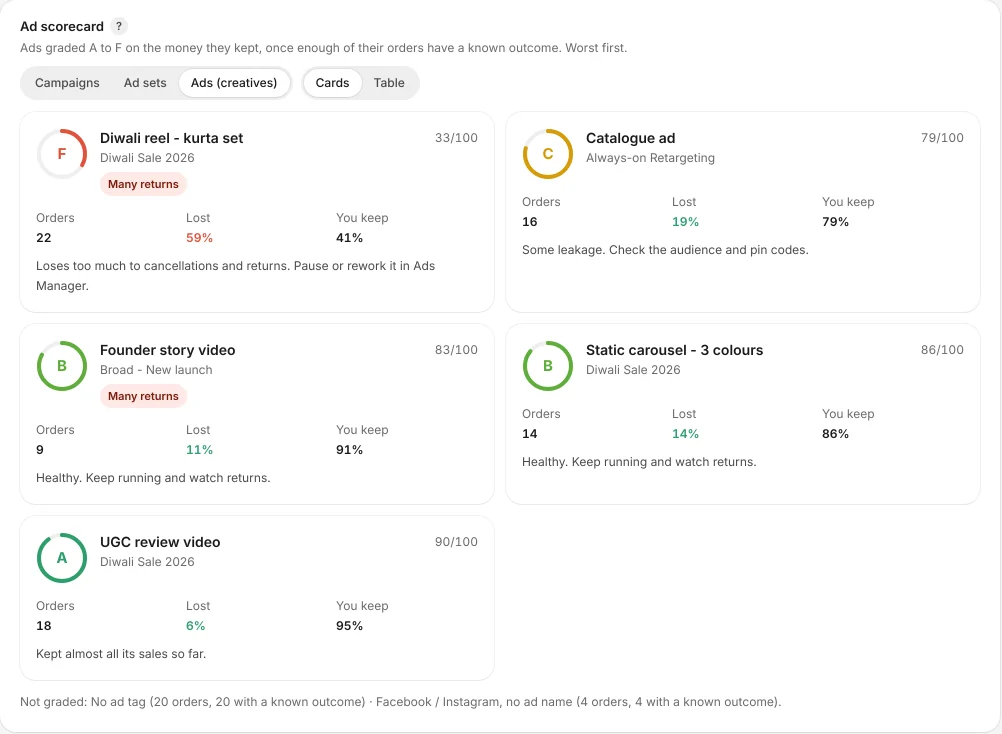
Ad scorecard (Starter)
- Every campaign, ad set and ad graded A to F on the money it kept. Worst first.
- Built from the UTM tags on your Shopify orders. A one-time setup in Ads Manager.
- RTO-heavy campaign alerts in the app when a campaign starts losing too much.
Ad spend and your ad account
Today you type in your monthly ad spend. An automatic Meta spend sync is coming soon, and it will be read-only. RTOGuard never creates, edits, pauses or publishes anything in your ad account.
How it works
Tag your ads
Add UTM tags to your Meta ads so each order carries its campaign, ad set and ad.
Add your spend
Type in your monthly ad spend in RTOGuard.
Read the scorecard
Outcomes fill in as orders are delivered, cancelled or returned.
Related features
RTO breakdown
Find the discount codes, products, order values, days, times and pin codes that bring returns.
Returns tracking
Returns and exchanges from Shopify count against the order and the ad that brought it.
COD risk score
Every COD order gets a 0 to 100 risk score the moment it is placed, a tag in Shopify and a risk card on the order page.
Know which COD orders to ship, and which ads really pay.
Install RTOGuard free. Your next COD order gets a risk score the moment it is placed. Start in test mode if you want to watch first.