 RTOGuard
Call risky buyers before you ship.
Medium and high risk COD orders land on one Call list. Your team sees why the order is risky, calls the buyer, and taps what happened.
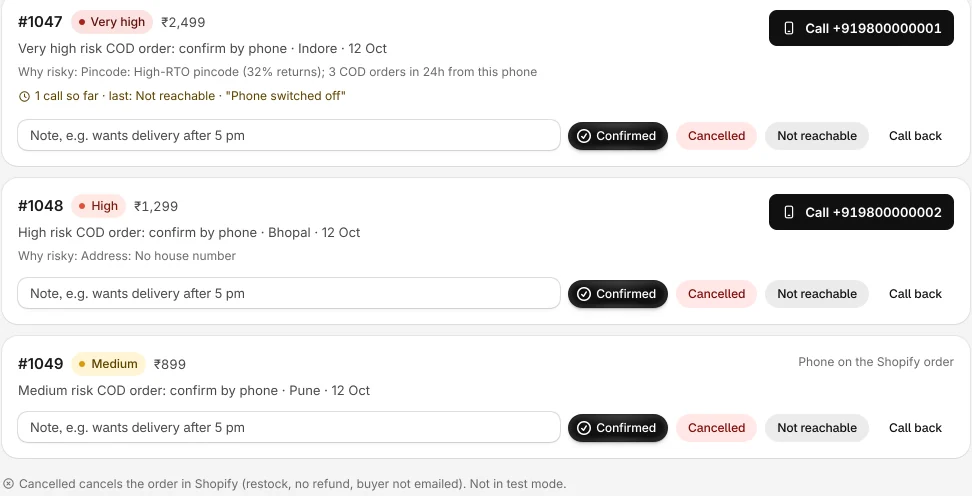
On every card
- The reason the order scored high, in plain words.
- The buyer's earlier orders with your store.
- Address gaps to confirm on the call, like a missing house number.
- A short call script so anyone on the team can make the call.
- A note field, for things like "wants delivery after 5 pm".
Log what happened
One tap per outcome:
- Confirmed: the buyer wants the order. Ship it.
- Cancelled: cancels the order in Shopify and puts the stock back. No refund is needed on COD and the buyer is not emailed. Nothing is cancelled in test mode.
- Not reachable: logged with the call count, so you can try again.
- Call back: the buyer asked you to call later.
Message on WhatsApp
Each card has a Message on WhatsApp link. It opens WhatsApp on your team's own phone with the buyer's chat. RTOGuard sends nothing itself. Automatic WhatsApp confirmation is coming soon.
Held high-risk orders
When a high-risk order is held, the order page shows Ship it and Cancel order buttons next to the reasons. You choose who goes on the list: all COD orders, only risky ones, or none.
How it works
Risky order arrives
Medium and high risk COD orders are added to the Call list.
Your team calls
Tap the number or open WhatsApp on your own phone, and follow the script.
Tap the outcome
Confirmed orders ship. Cancelled orders are cancelled in Shopify.
Related features
COD risk score
Every COD order gets a 0 to 100 risk score the moment it is placed, a tag in Shopify and a risk card on the order page.
WhatsApp confirmation
Automatic COD confirmation on WhatsApp. Coming soon.
Real ROAS
See booked, cancelled, returned and kept revenue, and your real ROAS per campaign, ad set and ad.
Know which COD orders to ship, and which ads really pay.
Install RTOGuard free. Your next COD order gets a risk score the moment it is placed. Start in test mode if you want to watch first.